DiskBleed - Universal EDR bypass for credential access
Apr 1, 2026
CVE Number
Credits
Kevin Gonzalez of Pentraze Cybersecurity

Raw NTFS Access vs. Modern EDR Defenses.
DiskBleed is a low-level NTFS access technique that allows for the full recovery of files locked by the operating system, including the Active Directory database (NTDS.DIT) and the Registry hives (SYSTEM, SAM, SECURITY), without creating snapshots, or generating the behavioral patterns that modern EDR solutions typically flag as suspicious.
[!] DISCLAIMER [!] The goal of this research is to understand how current credential extraction techniques work and how Windows defenses can be bypassed from a different perspective. No executable artifacts or full attack chains are being published.
File locking in Windows resides within the I/O Manager and the File System Driver. When a process attempts to open a file, the request travels through the device stack to the file system driver, which checks for an active lock and returns a sharing error.
If that stack is bypassed and the physical device is accessed directly as a character object, the file system driver never gets to consult its locks. The lock is not evaluated because it is never questioned.
Introduction
Windows exposes its volumes and disks as device objects accessible through the Device Namespace. An open handle to \\.\C: does not represent a file system; it represents the underlying physical volume. Reading from that handle means reading raw sectors, without the NTFS driver interposing any locking logic.
// The file system driver never sees this call.
// For him, these bytes do not exist.

HANDLE hVol = CreateFile("\\\\.\\C:",
                         GENERIC_READ,
                         FILE_SHARE_READ | FILE_SHARE_WRITE,
                         NULL, OPEN_EXISTING, 0, NULL);

// From here: ReadFile() operates on physical sectors.
// The NTDS.DIT lock does not exist in this space.
What follows is a parsing operation: reading the Boot Sector to understand the volume geometry, locating the MFT (Master File Table), iterating through its records to find the target files by name and parent path, and extracting their content by following the data runs that map the file’s clusters on the disk.
Once the target file’s MFT record is located, the unnamed $DATA attribute (name_length == 0, corresponding to the primary data stream) is searched. Extraction varies depending on whether the attribute is resident or non-resident:
- Resident Attributes: If the non_resident flag is 0, the file’s entire content is embedded within the MFT record itself, immediately following the attribute header. It is read directly from the record buffer and written to the destination file. This case is typical for very small files (<≈700 bytes).
- Non-Resident Attributes and Data Runs: For large files such as NTDS.DIT (generally ranging from hundreds of MB to several GB), the $DATA attribute is non-resident. The NONRESIDENT_ATTR header contains the actual file size, the allocated size (rounded to cluster multiples), and the offset within the attribute where the data runs list begins.
NTFS does not necessarily store a file’s data contiguously. File fragments are described in a list of data runs: pairs of (length, offset) that indicate which disk clusters contain which part of the file.
The data run decoding algorithm traverses the list until it encounters the 0x00 terminator byte. For each run, it:
- Decodes the length in clusters and the differential LCN offset.
- Accumulates the offset to obtain the absolute LCN (Logical Cluster Number).
- Reads all clusters in the fragment sequentially by sectors.
Writing to the destination file is performed in chunks of 256 clusters (1 MB with 4 KB clusters) to optimize memory usage and allow for the processing of highly fragmented files.
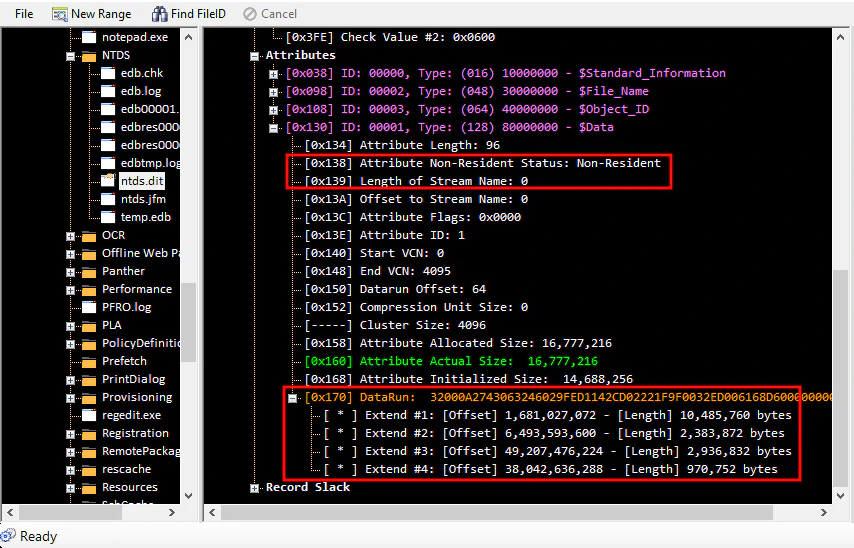
This image corresponds to the reading of the ntds.dit record in the MFT; we can observe the attribute with the non-resident property and the different data runs hosting the file.
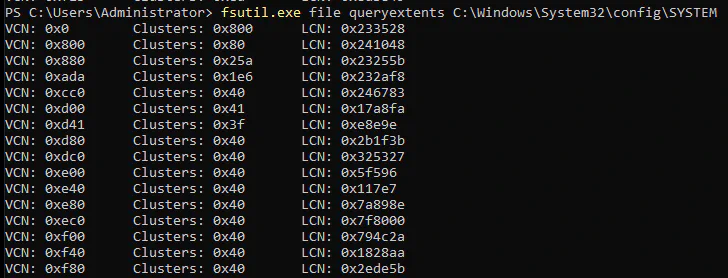
The following image corresponds to the reading of the SYSTEM record in the MFT. We can see the different data runs hosting the file with fsutil.exe, a native Windows tool.
Why Current Techniques are “Burned”.
Known techniques for obtaining credentials by handling NTDS.DIT on a live system have been deeply studied. Precisely because of this, modern EDRs have them cataloged as high-fidelity patterns:
| Technique | Procedure | Why EDRs Detect It |
|---|---|---|
| OS Credential Dumping: NTDS | Volume Shadow Copy (VSS) | VSS creation generates events in ETW (Event Tracing for Windows) that EDRs monitor closely. Access to \Device\HarddiskVolumeShadowCopyX is a classic IOC. |
| secretsdump.py | Python script that extracts password hashes directly from the NTDS.dit or via remote replication (DRSUAPI). | |
| ntdsutil snapshot | A Microsoft-signed tool, but with a virtually unique usage pattern. Its execution combined with NTDS access raises high-confidence alerts. | |
| Invoke-NinjaCopy | A PowerShell script using known low-level API calls. The module’s signature and behavior are in the YARA and Sigma rules of any mature product. |
The common pattern: all these techniques follow predictable and documented execution paths. Their system calls are known, and their event sequences are recognizable. The EDR doesn’t need to be “intelligent”; it only needs to recognize a pattern it has already seen a thousand times.
DiskBleed
As an initial approach, an artifact was developed to exploit the technique locally; NTDS and SYSTEM files were successfully obtained without any operating system locks.
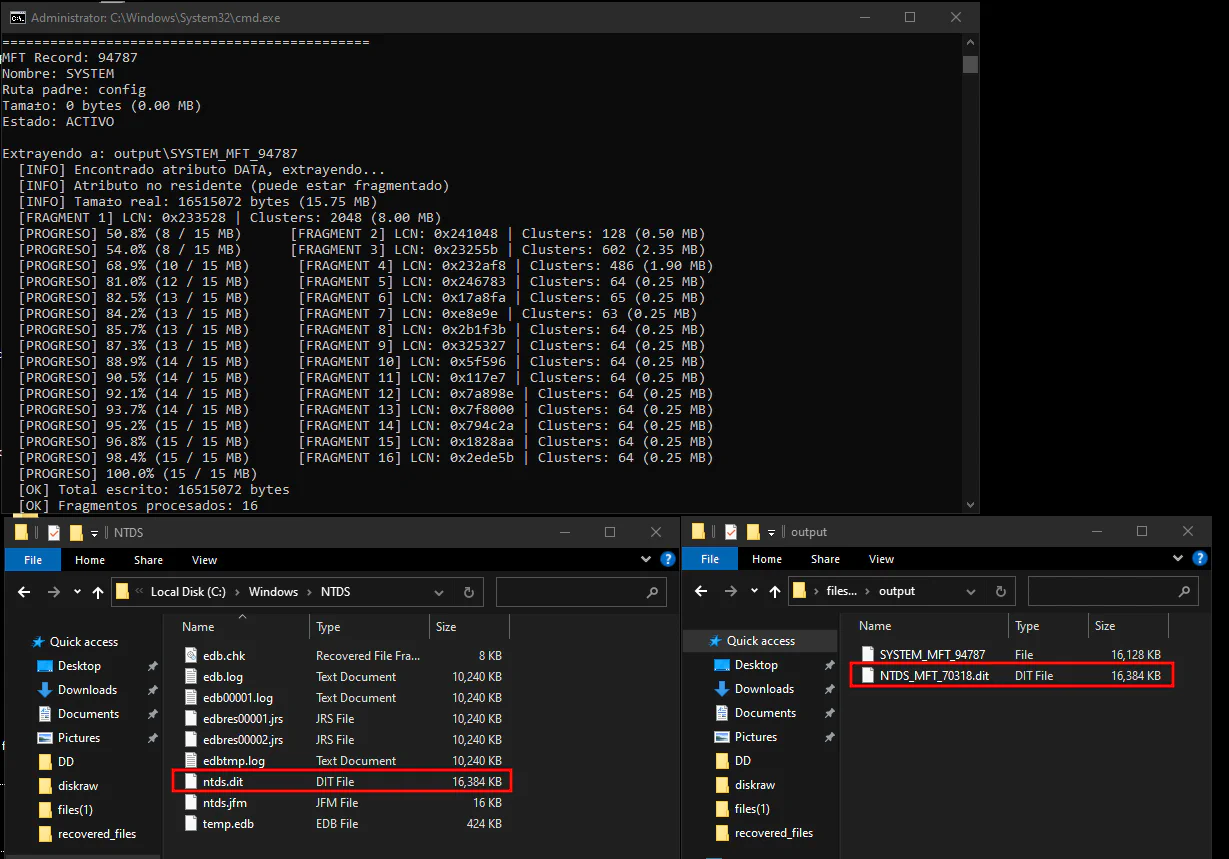
This image corresponds to the reading of the NTDS and SYSTEM records in the MFT. The tool is shown extracting the data that comprises the files.
To validate evasive capabilities against an enterprise grade EDR in a real world environment, an exfiltration approach based on a client-server architecture was implemented. To this end, an artifact capable of raw disk reading was developed which, acting as a server, exposes the data stream through a Named Pipe interface instead of using traditional network protocols prone to monitoring.
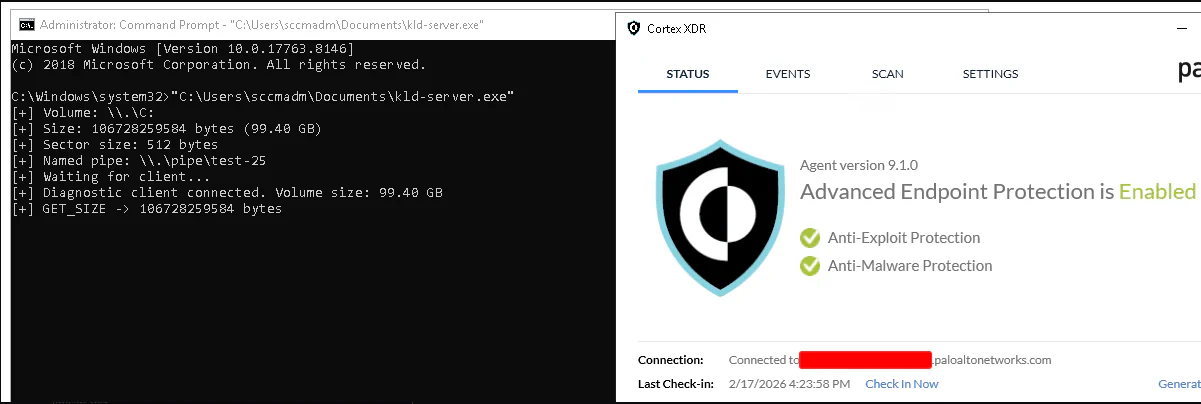
At the receiving end (Linux environment), a client artifact was used to establish the connection to the Named Pipe. The data stream is managed as follows:
FUSE (Filesystem in Userspace): The client uses FUSE to project the data stream from the pipe and transform it into a virtual disk image on the local file system.

Once the virtual block device is available, the file structure is mounted using ntfs-3g. With the disk mounted, the system allows direct navigation through the directory tree and selective extraction of information, functioning as if the disk were physically connected to the local machine.

Allowing unrestricted navigation within the Windows file system and exfiltration of files that are locked from user space in Windows.

A View into the Kernel.
The client program opens a handle to the device, which creates a _file_object that we can inspect by intercepting the NtReadFile service.
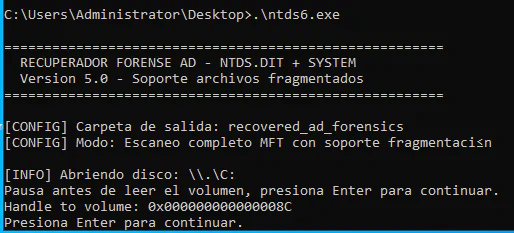
The ntds6.exe process has attempted to perform a read operation on an object whose handle is 0x8C. The instruction pointer (rip) is now at the prologue of the function, allowing us to inspect its arguments.
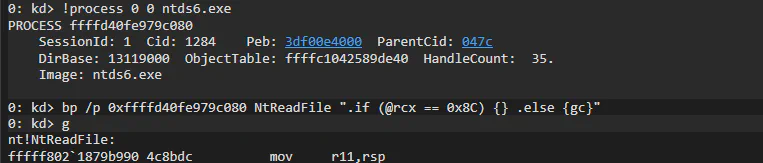
The artifact’s execution sequence interacts directly with the file system as follows:
ntds6.exe → ReadFile (Win32 API) → NtReadFile (Syscall) → Windows Kernel
This validates that the conditional breakpoint on Handle 0x8C effectively stopped the execution thread just as the artifact attempted to access the data.

ntds6.exe not only has the disk open but also has explicit read permissions (00120089).
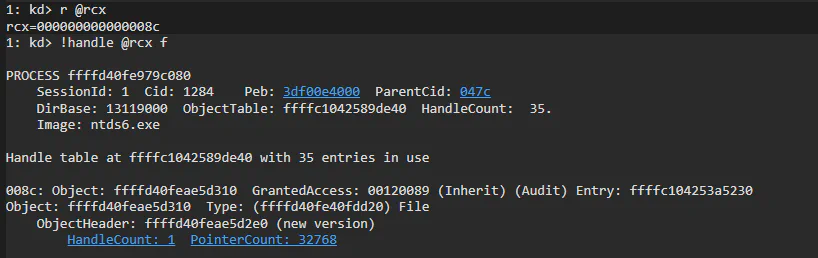
The structure confirms the permissions with which the disk was opened:
- ReadAccess : 0x1: The process has active permission to read the disk data.
- SharedRead / SharedWrite : 0x1: The disk allows other processes to read or write to it simultaneously, which is typical for active databases.
The fact that the FileName is empty in this structure is expected, as we are only performing a direct volume open (\\.\C:) and not a handle to a conventional file.
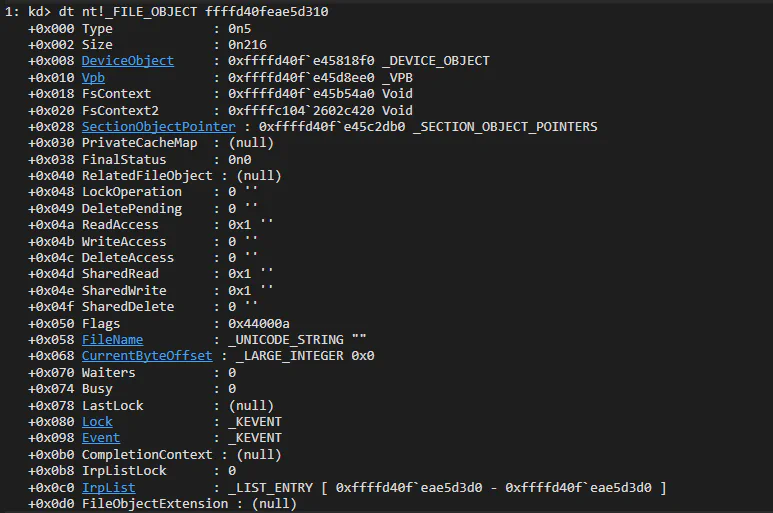
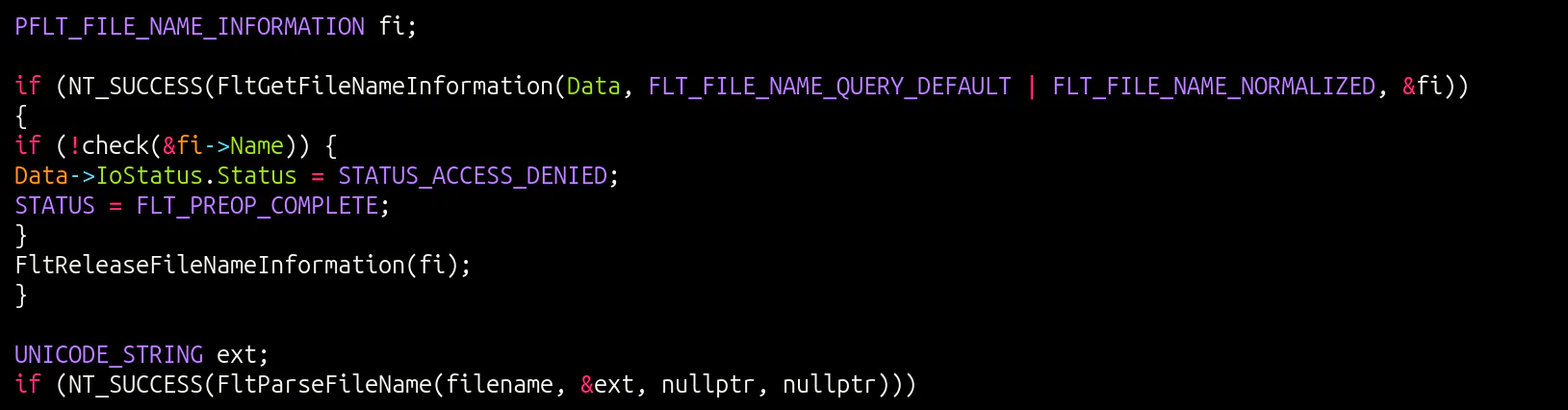
This is particularly useful, as a minifilter driver can identify when a file is being opened. It can see which file it is, which process is performing the open (FltGetRequestorProcessId), the requested access rights, etc. For example, an attacker could create a shadow copy and attempt to copy the SAM (\\GLOBALROOT\Device\HarddiskVolumeShadowCopyX\Windows\System32\config\SAM), and the minifilter would detect it. However, in our case, we are only opening the volume itself (\\.\C:), so the minifilter never sees individual file opens, only a raw read on the volume device object.
Here we are analyzing the _DEVICE_OBJECT (0xffffd40fe45818f0) associated with the _FILE_OBJECT identified in the previous step. This is the final piece to understanding where the file that ntds6.exe is trying to read is physically located.

The output reveals how Windows manages storage through layers:
- Main Driver: The device belongs to \Driver\volmgr (Volume Manager). This is the driver responsible for managing logical volumes in Windows.
- UpperDevices: Immediately above in the stack is an object for \Driver\volume. This indicates that read requests first pass through the generic volume layer before reaching the volume manager.
- FileSystem: The device is linked to \FileSystem\Ntfs. This definitively confirms that the file is stored on a partition formatted with NTFS.

This view is essential for understanding the flow of data from the hardware to the file system. The image shows the complete Device Stack for the object we have been tracking.
Stack Hierarchy:
List of drivers that process any Input/Output (I/O) requests for this volume:
- \Driver\volmgr (Lower Layer): The entry point in this stack is the Volume Manager. The object name is identified as HarddiskVolume2. This is the actual physical or logical partition where the data resides.
- \Driver\volume (Middle Layer): Acts as a generic volume class interface on top of the volume manager.
- \Driver\volsnap (Top Layer): This is the Volume Shadow Copy (VSS) device driver. Its presence indicates that this volume is VSS-capable.
Detection.
It is recommended to catalog any process that obtains a direct handle to the \\C: volume as suspicious. This allows for early detection of anomalous activities, ensuring operational continuity through the deployment of automated alerts or the preventive termination of unauthorized processes to minimize the exposure surface.
Conclusions.
For an adversary, the use of DiskBleed represents a critical strategic leap, as it allows them to execute the Credential Access tactic (TA0006) while bypassing the effectiveness of modern EDRs. By omitting conventional file control mechanisms and directly accessing disk structures to extract the NTDS.dit, this technique evades the File System Minifilter Drivers that security systems use to monitor access to sensitive data. This is critical in an offensive operation, as it not only guarantees the acquisition of secrets for lateral movement and privilege escalation but does so invisibly to kernel heuristic alerts, leaving incident response teams with no visibility into the total compromise of the domain.
Acknowledgments.
Rilke Petrosky and Carlos Garrido This research would not exist without them. Not only as technical references but as genuine guides throughout the process. Their willingness to share high-level knowledge, their patience during every work session, and their way of thinking through problems from the hardware layer up set the course for this entire investigation. The knowledge they generously contributed during the development of DiskBleed is the actual foundation upon which this paper stands. Honor to whom honor is due.